OpenSAI v1.0.0 · Materials v1.1.0
OpenSAI Product & Technical Overview
Distributed DAG computation offloading and bidirectional resource-application adaptation across heterogeneous edge devices.
1. Why Edge Collaboration Needs OpenSAI
Modern edge workloads—such as multi-vehicle cooperative perception, multi-camera video analytics, industrial inspection, and staged sensor processing—generate data across dispersed vehicles, roadside units, cameras, and edge servers. Processing everything on a single edge device hits compute limits, while streaming all raw data to a central cloud introduces high latency and bandwidth bottlenecks. Turning nearby CPU and GPU machines into one coordinated runtime typically runs into four engineering barriers:
- Dispersed data and locality constraints: Sensor streams live on specific devices; early stages must execute where data resides and forward compact intermediate artifacts automatically.
- Hardcoded multi-stage pipelines: Connecting preprocessing, parallel feature extraction, cross-device transport, and fusion usually requires custom networking and orchestration glue per application.
- Heterogeneous hardware and fluctuating links: Edge clusters mix lightweight CPUs with GPU servers over variable wireless or LAN links, while cooperating nodes may join or leave dynamically.
- Disconnected scheduling and application tuning: Traditional schedulers assume fixed application parameters, whereas application-level tuning lacks visibility into cluster-wide load—causing missed deadlines under contention or underutilized accuracy when resources are plentiful.
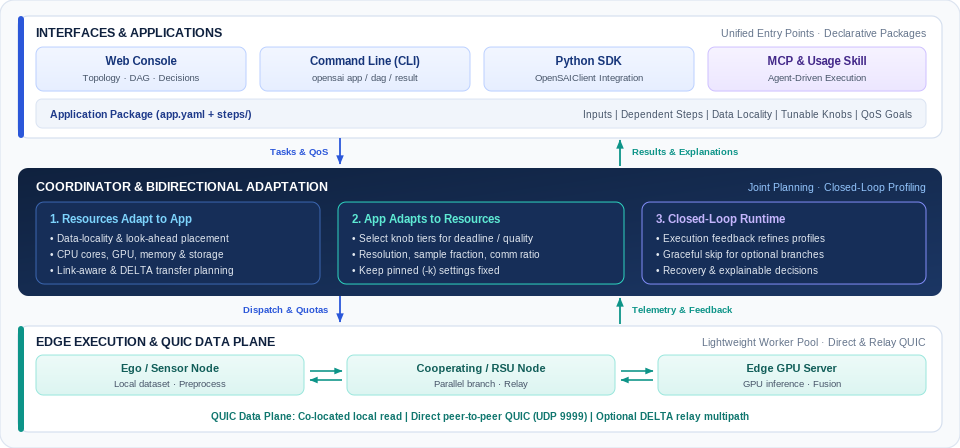
OpenSAI bridges applications and heterogeneous edge resources. Package your Python workflow as a declarative manifest (app.yaml) and step classes: OpenSAI handles device discovery, data-aware placement, four-dimensional resource control, peer-to-peer QUIC artifact transport, and goal-driven parameter adaptation—accessible through a bilingual Web console, CLI, Python SDK, and MCP-compatible AI agents.
2. Key Capabilities
| Capability | How OpenSAI Works | What You Gain |
|---|---|---|
| Declarative DAG Offloading & Fault Tolerance | Resolves step dependencies, runs independent branches in parallel, enforces data locality, and supports optional collaborator branches | Keep step code focused on domain logic; workflows continue gracefully even when optional cooperating nodes go offline |
| Bidirectional Adaptation | Resources → App: selects devices, CPU cores, GPUs, and bandwidth quotas; App → Resources: tunes declared knobs (resolution, sample fraction, dimensions, upload ratio) to meet deadline, fastest, or efficient QoS goals | Pin business-critical settings with -k and let the coordinator balance latency, output quality, and resource efficiency |
| Direct & Relay-Multipath QUIC Data Plane | Reads co-located artifacts locally, fetches cross-device outputs over QUIC (UDP 9999), and supports unified DELTA relay multipath (OPENSAI_MULTIPATH=1) | Aggregate spare relay capacity across ordinary QUIC connections without kernel patches, MPTCP, or MPQUIC |
| Lightweight Isolation & Closed-Loop Profiling | Worker pools apply CPU core affinity, memory budgets, egress rate limits, and artifact TTL cleanup while feeding measured runtimes back into performance profiles | Run directly on Windows, Linux, and macOS without Docker or Kubernetes, with scheduling estimates that improve over time |
| Unified Observability & Agent Control | Shares live device state, app catalogs, job traces, and decision explanations across the Web console, CLI, Python SDK, and opensai_mcp + Usage Skill | Inspect why every placement and parameter choice was made—or delegate execution and analysis to an AI agent |
3. Representative Scenarios & Included Applications
The release includes five runnable applications ranging from a zero-dependency standard-library template to multi-source GPU perception. Start on one laptop, then scale the exact same package across multiple machines:
| Included App | Scenario | Capabilities Demonstrated | Preparation |
|---|---|---|---|
number_stats | Staged numeric sampling | Minimal application manifest, cross-step artifact passing, sampling knob | Python standard library only |
cluster_analytics | Distributed shard clustering | Parallel shard processing, centroid merging, dims / iters deadline tuning | numpy; generates synthetic shards locally |
video_counting | Dual-branch video counting | Parallel visual pipeline, joint resolution and frame-stride selection | numpy; built-in synthetic frame generator |
coop_perception | Lightweight cooperative perception | Ego / vehicle / RSU point-cloud locality, selective comm volume, frame replay | numpy; local scene generator script |
how2comm_perception | 3D LiDAR cooperative detection | Edge GPU inference with How2comm, optional-participant skip, link-aware upload ratio | PyTorch + GPU on edge server, How2comm source/weights, V2XSet scene |
4. Launch in Three Minutes & Documentation Map
A single computer with Python 3.10+ is enough to run the coordinator hub, a worker device, and the prebuilt Web console—no GPU, Docker, or Node.js required. Clone the repository (or extract OpenSAI_Release.zip) and run:
git clone https://github.com/INSAI-institute/OpenSAI.git
cd OpenSAI
bash scripts/setup.sh
bash scripts/run.sh --with-web
source .venv/bin/activate
opensai dag submit -f examples/dags/pi_pipeline.json
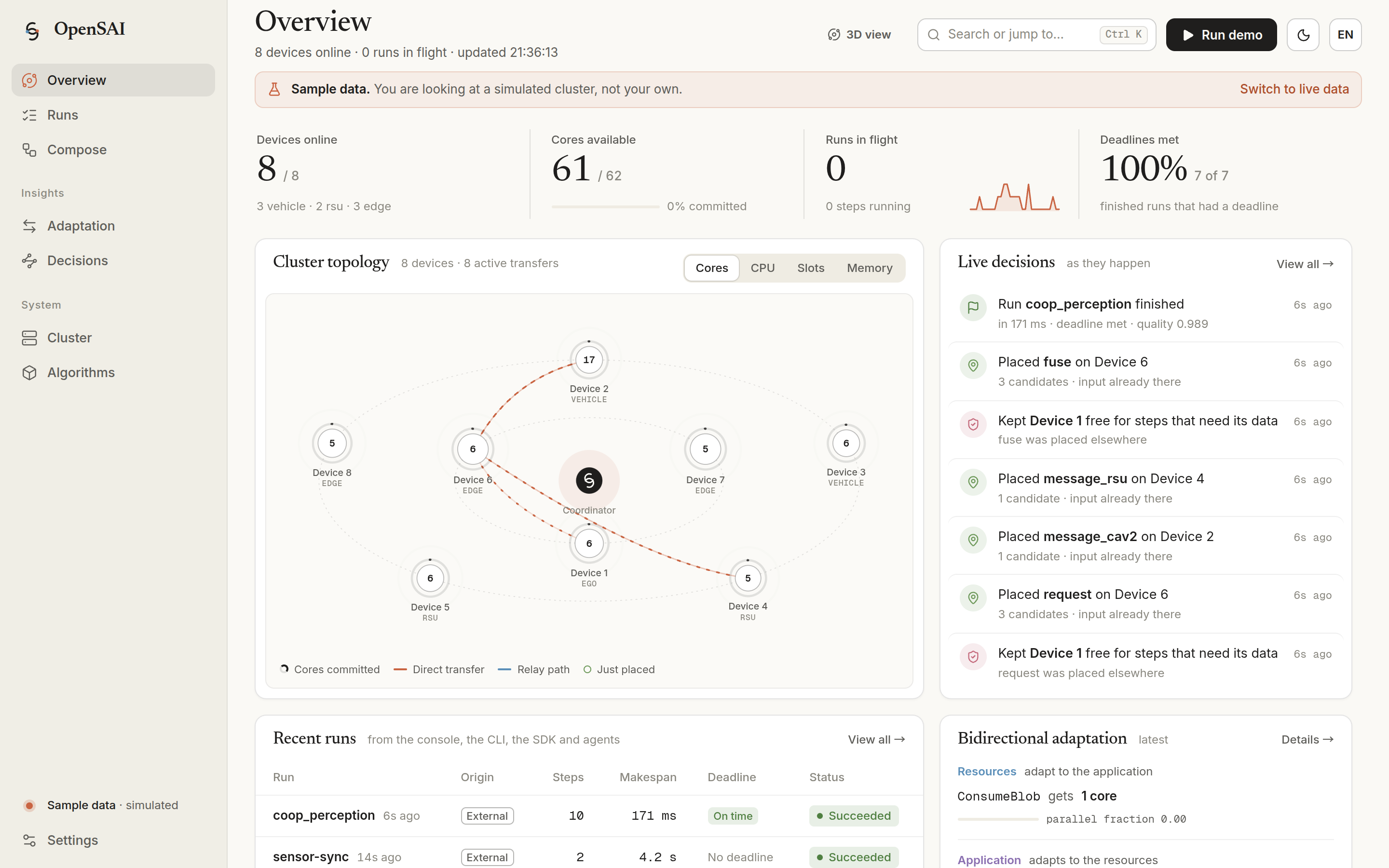
See the Quickstart Guide for Windows PowerShell commands and expected outputs. Open http://127.0.0.1:5000 in your browser to explore the console (switch between EN and 中 language, Paper / Ink themes, or click Run demo in the top bar).
Where to Go Next
- First 10-minute hands-on run: Follow the Quickstart Guide to verify your setup, scaffold a custom app, and compare fixed vs. adaptive execution.
- Cluster deployment, app authoring & API reference: Read the User Manual for multi-host networking, manifest schemas, QUIC multipath, Python SDK, and CLI commands.
- Connect Claude, Cursor, OpenClaw, or MCP clients: Start with the Agent Integration Guide, paired with the Usage Skill Specification.
- Troubleshooting, compliance & citation: Check FAQ, Support & Maintenance for diagnostics, Licensing & Third-Party Notices for redistribution rules, and Contributing & Citation to participate or cite OpenSAI in academic work.
Institution, Repository & License
OpenSAI is developed and published by Fudan University and the Institute on Networking Systems of AI (INSAI) at github.com/INSAI-institute/OpenSAI (versioned bundles and narrated demos in Releases) under the MIT License (中文概览).