OpenSAI v1.0.0 · Materials v1.1.0
OpenSAI User Manual
Deploy heterogeneous edge clusters, author and manage distributed applications, and inspect every scheduling and adaptation decision.
This manual serves application developers, cluster users, and deployment maintainers working with OpenSAI. First-time users should complete the 10-minute Quickstart Guide before using individual chapters here as a reference. Unless noted otherwise, commands run from the cloned repository (github.com/INSAI-institute/OpenSAI) or extracted release root with the .venv virtual environment active.
Find the Task You Need
| What You Want to Do | Where to Start |
|---|---|
| Complete a first local install and job on one machine | Quickstart Guide · Chapter 2: Install & Run Locally |
| Connect multiple computers or edge servers into a cluster | Chapter 3: Deploy a Multi-Host Cluster (ports & role tags) |
| Compose DAGs and inspect topology or decisions visually | Chapter 4: Use the Bilingual Web Console |
| Run built-in perception/analytics apps or manage versions | Chapter 5: Run & Manage Applications (incl. How2comm guide) |
| Package your own Python or ML code as a reusable app | Chapter 6: Build Reusable Application Packages |
| Compose existing algorithms into an ad-hoc JSON DAG | Chapter 7: Submit DAGs Directly |
| Set deadlines, quality floors, and joint placement modes | Chapter 8: Choose Timing, Quality & Resource Goals |
| Manage local datasets and enable QUIC relay multipath | Chapter 9: Data Management & Multipath Transfers |
| Interpret metrics, explanations, SDK calls, and CLI flags | Chapter 10: Results & Metrics · Chapter 11: Python SDK · Chapter 12: CLI Reference |
1. Understand OpenSAI
1.1 Architecture & Role
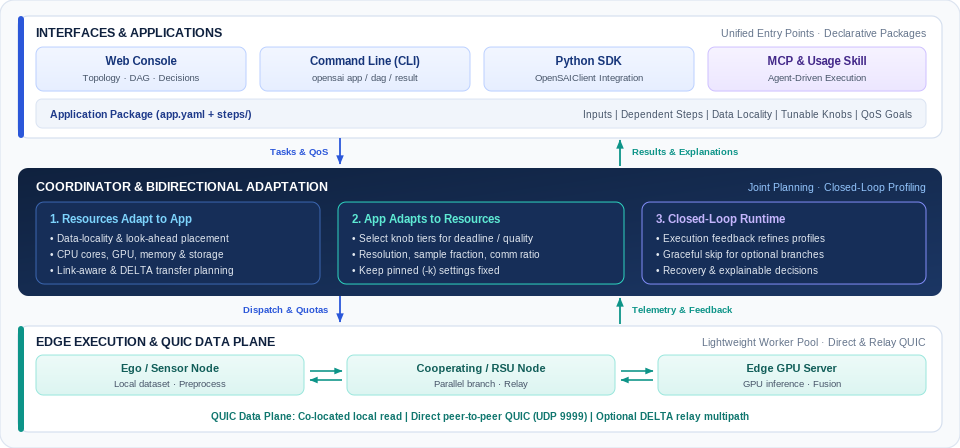
OpenSAI turns multiple heterogeneous CPU and GPU edge machines into one callable computing environment. You supply declarative application steps, data-locality rules, tunable knobs, and execution goals; OpenSAI resolves dependencies, assigns devices and four-dimensional resources, moves intermediate artifacts across workers, and returns both domain results and transparent decision explanations.
- For application developers: Focus on per-step Python algorithms and domain logic instead of writing custom socket transport, retries, or load-balancing glue.
- For cluster users: Invoke diverse applications through consistent Web, CLI, Python SDK, and AI-agent interfaces under explicit latency or quality goals.
- For deployment maintainers: Monitor live CPU, memory, bandwidth, and storage ledgers and audit why every placement or tuning choice was made.
1.2 Five Core Concepts
| Term | Meaning in OpenSAI |
|---|---|
| Hub / Coordinator | The central process (server.py) that accepts requests, tracks devices and catalogs, computes joint scheduling decisions, and aggregates job results |
| Worker Device | The execution daemon (run_device.py) that runs steps inside an isolated worker pool and exchanges intermediate artifacts over QUIC |
| Algorithm / Step | A Python class following a lightweight run() contract that reads predecessor artifacts and reports domain outputs and quality |
| DAG | A directed acyclic graph of steps and dependencies; independent branches execute in parallel across eligible workers |
| Application & Job | An application is a reusable package (app.yaml + steps/); a job (job_id) is one tracked execution of that application |
1.3 Bidirectional Adaptation
OpenSAI couples two complementary adaptation directions inside one closed-loop coordinator:
- Resources adapt to applications: Chooses target devices, CPU core counts, GPU execution, and transfer paths based on data locality, task speedup curves, and live load.
- Applications adapt to resources: Selects permitted application knobs—such as resolution, sampling fraction, feature dimensions, or collaborator upload ratio—to meet
deadline,fastest, orefficientQoS goals.
After each step finishes, measured duration feeds back to refine hardware-specific performance profiles. Pin essential business settings with -k while leaving flexible knobs open to adaptation.
1.4 Four Equivalent Interfaces
| Interface | Best Suited For |
|---|---|
| Bilingual Web Console | Exploring 3D cluster topology, composing DAGs visually, comparing predicted vs. actual runs, and auditing decisions |
Command Line (opensai) | Interactive terminal operation, batch scripts, and remote SSH administration |
Python SDK (OpenSAIClient) | Embedding distributed execution inside backend services, pipelines, or benchmark harnesses |
| MCP Server & Usage Skill | Letting Claude, Cursor, OpenClaw, or MCP clients translate natural-language intents into cluster runs |
All four interfaces talk to the same hub and application registry—jobs submitted from the CLI, SDK, or an AI agent appear immediately in the Web console.
2. Install & Run Locally
2.1 System Requirements & Dependency Profiles
- Baseline: Python 3.10 or later on Windows 10/11, Linux (such as Ubuntu 22.04/24.04), or macOS. Because the release includes the prebuilt Web console and executes steps in native Python worker pools, Node.js, Docker, and Kubernetes are not required for normal operation.
- Optional profiles: Base setup installs only lightweight core dependencies (Redis client, Flask bridge, system telemetry, and QUIC). Install
numpy, OpenCV, PyTorch, or the MCP SDK only when needed.
2.2 One-Time Environment Setup
Linux / macOS:
bash scripts/setup.sh
source .venv/bin/activate
Windows PowerShell:
powershell -ExecutionPolicy Bypass -File scripts\setup.ps1
.venv\Scripts\Activate.ps1
Setup creates .venv, installs core packages and the opensai CLI/SDK, and uses an existing redis-server or prepares a portable Redis instance (building portable Redis on Linux / macOS requires cc, make, and curl or wget; Ubuntu/Debian Python also requires python3-venv). Set OPENSAI_PYTHON to choose a specific Python interpreter, or PIP_INDEX_URL to use a regional PyPI mirror.
Install optional profiles via setup flags or pip:
# Option A: Setup flags
bash scripts/setup.sh --agent    # MCP agent dependencies (use -Agent in PowerShell)
bash scripts/setup.sh --ml       # PyTorch / TorchVision ML profile (use -Ml in PowerShell)

# Option B: Direct pip install inside activated .venv
python -m pip install numpy
python -m pip install -r Offloading-System/requirements-optional.txt
python -m pip install -r Offloading-System/requirements-ml.txt
python -m pip install -r Offloading-System/requirements-agent.txt
2.3 Start, Check, and Stop Services
Linux / macOS:
bash scripts/run.sh --with-web
opensai devices list
opensai cluster status
Windows PowerShell:
powershell -ExecutionPolicy Bypass -File scripts\run.ps1 -WithWeb
opensai devices list
opensai cluster status
Open http://127.0.0.1:5000 in your browser. Note that run scripts are idempotent: re-running them cleanly restarts local hub and worker processes, so invoke them between active jobs.
To stop local services (append --all / -All to also stop the portable Redis managed by OpenSAI):
- Linux / macOS:
bash scripts/stop.sh --all - Windows PowerShell:
powershell -ExecutionPolicy Bypass -File scripts\stop.ps1 -All
2.4 Start the Web Console Separately
When the hub and workers are already running without a local Web bridge, launch the :5000 UI bridge standalone via bash scripts/start_console.sh (or powershell -ExecutionPolicy Bypass -File scripts\start_console.ps1 / start-console.bat on Windows; supports --build and --no-browser). The bridge binds to 127.0.0.1:5000 by default; on a trusted LAN, set OPENSAI_BRIDGE_HOST=0.0.0.0 or use an SSH tunnel (ssh -L 5000:127.0.0.1:5000 <hub-host>). Even without a live hub connection, open ?offline (or click Explore with sample data in the banner) to tour every page with simulated data.
3. Deploy a Multi-Host Cluster
3.1 Assign Roles & Start Workers
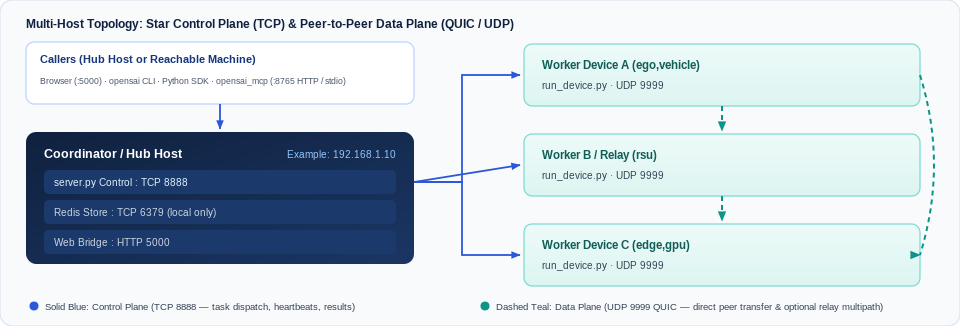
Pick one network-reachable machine to run the Coordinator Hub (by default, run also starts one local worker on the hub host). Every additional edge machine runs only run_device.py.
Using 192.168.1.10 as an example hub IP:
Step 1 — Start the Hub machine:
export OPENSAI_HOST=192.168.1.10
bash scripts/run.sh --with-web
Step 2 — Start each remote Worker machine (after running setup):
Linux / macOS:
source .venv/bin/activate
export OPENSAI_HOST=192.168.1.10
python Offloading-System/dag_offload/run_device.py
Windows PowerShell:
$env:OPENSAI_HOST="192.168.1.10"
.venv\Scripts\python.exe Offloading-System\dag_offload\run_device.py
Remote workers do not run Redis—Redis stays local to the hub machine.
3.2 Ports, Firewalls & Network Security Boundary
| Service | Default Endpoint | Who Needs Network Access |
|---|---|---|
Hub control plane (server.py) | TCP 8888 | All workers, CLI, Python SDK, MCP server, and Web bridge |
| Worker data plane (QUIC) | UDP 9999 | Other workers fetching intermediate artifacts or relaying multipath streams |
| Redis state store | TCP 6379 | Hub-local processes only |
| Web console bridge | HTTP 5000 (127.0.0.1 default) | Local browser (set OPENSAI_BRIDGE_HOST on trusted LANs or use an SSH tunnel) |
| Remote MCP HTTP server | HTTP 8765 (/mcp) | Remote MCP clients (Bearer token required on non-loopback addresses) |
3.3 Dataset Directories & Device Role Tags
Configure a worker's dataset directory and role tags before starting run_device.py:
export OPENSAI_DATA_DIR=/data/opensai
export OPENSAI_DEVICE_TAGS=edge,gpu
python Offloading-System/dag_offload/run_device.py- Immediate child files and subdirectories under
OPENSAI_DATA_DIRare automatically advertised as datasets inopensai data list(use symbolic links or directory junctions to expose data stored on external drives). OPENSAI_DEVICE_TAGSassigns semantic role labels (such asego,vehicle,rsu,edge,gpu) matched byrun_onrules in application manifests.
3.4 Multiple Worker Processes on One Host
To test multi-device workflows or relay logic on a single computer, assign each worker process a distinct OPENSAI_DATA_PORT and OPENSAI_ARTIFACTS_DIR (and optionally partition cores with OPENSAI_DEVICE_CPUS). Remember that co-hosted processes still share underlying hardware when evaluating real-world performance.
4. Use the Bilingual Web Console
4.1 Language, Paper & Ink Themes, and Live vs. Sample Data
Open http://127.0.0.1:5000:
- Language, theme & command palette: The console opens in English with the warm Paper light theme by default. Click
EN/中in the top-right corner to switch between English and Chinese, or click the sun/moon icon to switch between Paper (light) and Ink (dark); preferences persist in browser storage. The top bar also provides a command palette (Ctrl K/⌘K) and a one-click Run demo button. - Live vs. Sample data: Check the bottom-left sidebar indicator for
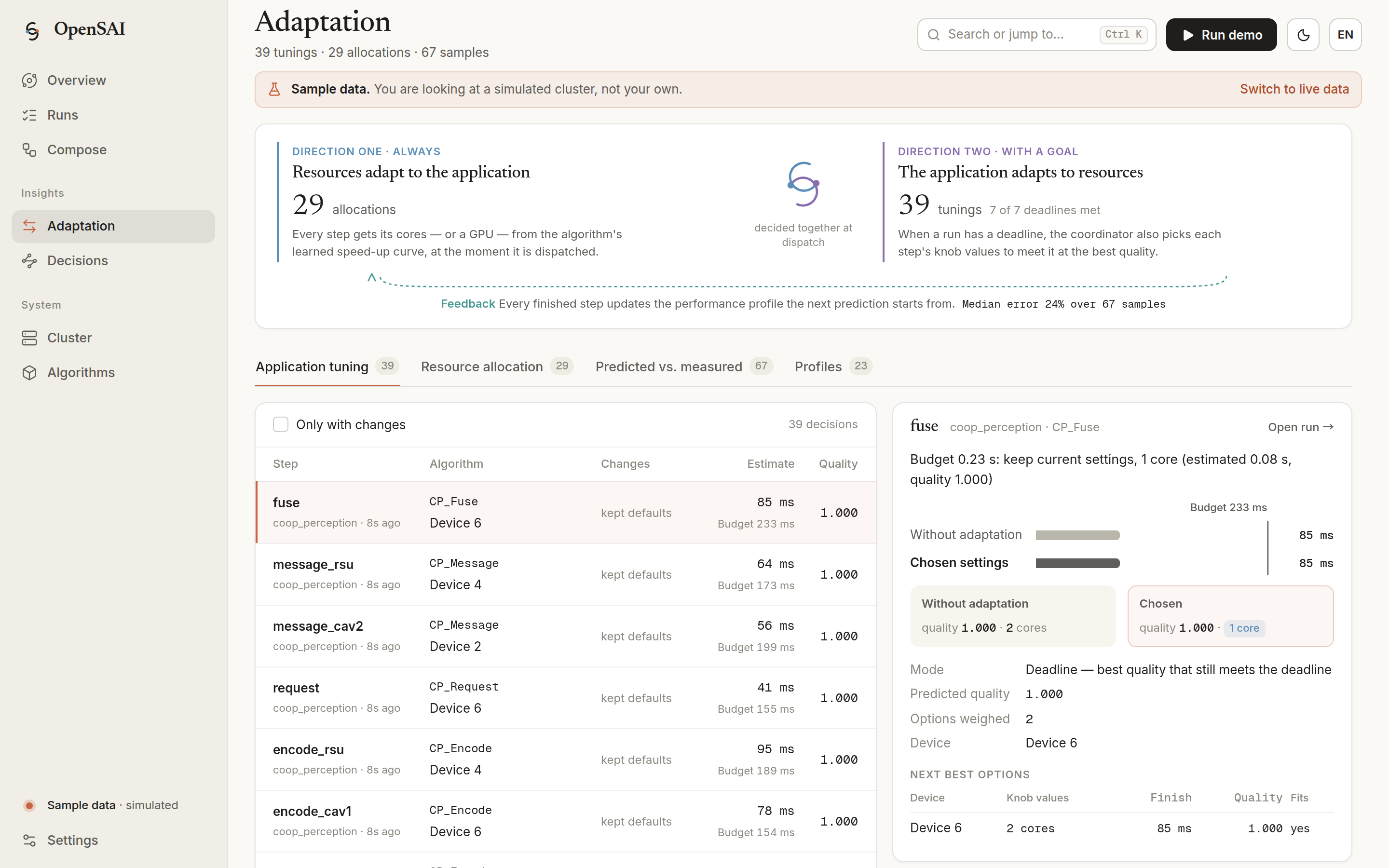
Connected · live. When exploring offline via?offlineor Settings, a top banner displaysSample data.—clickSwitch to live dataon that banner whenever you want to view your real cluster.
4.2 Guide to the Eight Console Pages
| Sidebar Page (Chinese Label) | What You Use It For |
|---|---|
| Overview(总览) | Inspect the 2D orbit map and immersive 3D view, online workers, available cores, active runs, deadline attainment, and live decisions |
| Runs(任务) | Browse jobs from the console, CLI, SDK, and agents; inspect execution timelines, per-step outputs, and durations |
| Compose(编排) | Wire DAG steps visually, import/export JSON, set QoS goals, and run registered applications directly from the Apps tab |
| Adaptation(双向适配) | Audit parameter tuning decisions, core/GPU allocations, predicted-vs-measured scatter plots, and learned Profiles |
| Decisions(决策) | Trace step placement scores, 4D resource reservations, direct vs. relay QUIC transfers, and recovery events |
| Cluster(集群) | Monitor worker core efficiency in card or table views and inspect each device's 4D Resource ledger |
| Algorithms(算法) | Browse built-in and uploaded step algorithms, parameters, knob schemas, declared priors, and measured speedups |
| Settings(设置) | Switch Paper/Ink theme and language, configure the bridge address, toggle sample data, and review System parameters |
4.3 Standard Operational & Debugging Flow
Verify online workers in Overview (or Cluster) → submit work from the CLI/SDK or Compose (including the Apps tab) → inspect outputs and timing in Runs → open Adaptation or Decisions to understand specific optimization or transfer choices. When a job fails, open the failed step in Runs—missing packages, missing datasets, or domain errors appear directly in its output.
5. Run & Manage Applications
5.1 Discover, Validate & Register Applications
opensai app list
opensai app info cluster_analytics
opensai app validate examples/apps/cluster_analytics
opensai app register examples/apps/cluster_analytics
opensai app run cluster_analytics -i points=30000 --wait
app info lists accepted inputs, tunable knobs, steps, and default qos. validate checks package structure locally; register uploads the manifest and steps/ code to the hub and synchronizes step modules to workers (remote management uses OPENSAI_ADMIN_TOKEN). Third-party Python packages, external weights, and datasets must be installed on eligible workers separately.
5.2 Inputs, Pinned Knobs & QoS Flags
| CLI Flag | Example | Effect |
|---|---|---|
Business input -i | -i points=30000 -i seed=1 | Supplies per-run input data parameters |
Pinned knob -k | -k dims=16 | Locks a knob to a fixed value for this run |
Deadline --deadline | --deadline 3 | Sets an end-to-end target duration in seconds |
Objective --mode | --mode fastest | Selects deadline, fastest, or efficient optimization |
Quality floor --min-quality | --min-quality 0.9 | Sets a minimum acceptable score on the app's quality scale |
Synchronous wait --wait | --wait --timeout 120 | Blocks in the terminal until completion |
Call flags override corresponding manifest defaults; omitting --deadline keeps any default deadline_s declared in app.yaml.
5.3 Versioning, Updates & Removal
Bump version in app.yaml after editing code and run register again to update an application in place (pass --no-replace to forbid overwriting an existing name):
opensai app register my_app --no-replace
opensai app run my_app --app-version 1.0 --wait
opensai app unregister my_app
unregister removes the hub registration and synchronized step code—wait for active jobs to finish first, and keep your local package directory for re-registration.
5.4 Choosing Among the Five Included Applications
| Application | What It Demonstrates | Preparation |
|---|---|---|
number_stats | Minimal stdlib app, cross-step artifact passing, sampling knob | Standard library only (full code in Section 6.2) |
cluster_analytics | Parallel two-shard K-Means clustering, tuning, and centroid merge | numpy; generates synthetic shards locally |
video_counting | Dual-branch synthetic video counting, resolution & frame-stride knobs | numpy; built-in synthetic frame generator |
coop_perception | Ego / vehicle / RSU point-cloud locality, selective comm ratio, fusion | numpy; includes scene generator and frame replay script |
how2comm_perception | Edge GPU 3D LiDAR cooperative detection with the How2comm model | PyTorch + GPU on edge server, How2comm source/weights, V2XSet scene |
5.5 Walkthrough: Lightweight Cooperative Perception (coop_perception)
This workflow models an ego vehicle (cav1), a cooperating vehicle (cav2), and a roadside unit (rsu) sensing nearby objects: each participant processes its local point cloud and forwards selected detections to a fusion step that computes tp, fp, fn, and f1.
1. Generate a local scene and run one frame:
python -m pip install numpy
python examples/apps/coop_perception/make_scene.py Offloading-System/data --name syn --frames 20
opensai app register examples/apps/coop_perception
opensai data list
opensai app run coop_perception -i scene=syn -i frame=0 --wait
(If OPENSAI_DATA_DIR is customized, pass that path instead; run once syn_cav1, syn_cav2, and syn_rsu appear in opensai data list.)
2. Compare fixed communication volume vs. deadline adaptation:
The comm knob controls the fraction of object messages sent by collaborators (0.1, 0.25, 0.5, 1.0):
# Compare two pinned communication ratios
opensai app run coop_perception -i scene=syn -i frame=0 -k comm=1.0 --wait
opensai app run coop_perception -i scene=syn -i frame=0 -k comm=0.25 --wait

# Omit -k to let OpenSAI adapt automatically for a 0.8-second target
opensai app run coop_perception -i scene=syn -i frame=0 --deadline 0.8 --wait
3. Multi-frame replay & multi-device placement:
python examples/apps/coop_perception/replay.py --scene syn --fps 2 --frames 0-19 --json coop-run.jsonTo distribute across machines, place syn_cav1, syn_cav2, and syn_rsu on workers tagged ego,vehicle, vehicle, and rsu respectively—reading steps automatically follow their declared datasets.
5.6 Reproducing GPU LiDAR Detection (how2comm_perception)
To run the full How2comm neural perception pipeline on an edge GPU server (see examples/apps/how2comm_perception/README.en.md for full details):
- Clone
third_party/How2command place the V2XSetconfig.yamlandnet_epoch32.pthcheckpoint underpre-train/v2xset/(built-in pure PyTorch/NumPy equivalents eliminate custom CUDA extension compilation); - Install
requirements-ml.txtpluseinops shapely icecream matplotlibon the GPU server (OPENSAI_DEVICE_TAGS=edge); - Prepare per-participant datasets (
v2xraw_cav1,v2xraw_cav2,v2xraw_rsu) withprepare_datasets.py, register the app, and runopensai app run how2comm_perception -i frame=40 --wait(absent optional vehicles are skipped automatically).
6. Build a Reusable Application
6.1 Package Layout & Limits
An application package consists of app.yaml (or app.json) plus step modules under steps/ named Algorithm_<Name>.py:
- Match the filename, class name, and
__all__[0]entry (use an app-specific prefix such asAlgorithm_MyApp_Loadto avoid naming collisions); - Keep step files self-contained, importing standard-library modules and packages installed on eligible workers;
- Packages support up to 32 step files, at most 1 MB per file and 3 MB of step code in total.
6.2 Complete Example: number_stats
This exact package ships in examples/apps/number_stats. Run it first, then inspect its three files:
opensai app validate examples/apps/number_stats
opensai app register examples/apps/number_stats
opensai app run number_stats --wait
1. Manifest number_stats/app.yaml:
name: number_stats
version: "1.0"
title: Number statistics
description: Generate numbers and calculate a sampled mean.
inputs:
  count:
    type: integer
    default: 10000
    minimum: 100
    maximum: 100000
knobs:
  sample:
    description: Fraction of input values included in the summary.
    values: [0.25, 0.5, 1.0]
    default: 1.0
    quality: [0.25, 0.5, 1.0]
    bind: [summarize.sample]
steps:
  - name: generate
    algorithm: Algorithm_NumberStats_Generate
    params: {count: "${count}"}
  - name: summarize
    algorithm: Algorithm_NumberStats_Summarize
    after: [generate]
output: summarize
qos:
  deadline_s: 3
2. Producer step number_stats/steps/Algorithm_NumberStats_Generate.py:
import json

__all__ = ["Algorithm_NumberStats_Generate"]

class Algorithm_NumberStats_Generate:
    def __init__(self, param_dict, data_dict):
        self.param = param_dict or {}

    def run(self):
        count = int(self.param.get("count", 10000))
        values = [i % 101 for i in range(count)]
        with open(self.param["_artifact_out"], "w", encoding="utf-8") as stream:
            json.dump(values, stream)
        return f"Generated {count} values"
3. Consumer step number_stats/steps/Algorithm_NumberStats_Summarize.py:
import json

__all__ = ["Algorithm_NumberStats_Summarize"]

class Algorithm_NumberStats_Summarize:
    def __init__(self, param_dict, data_dict):
        self.param = param_dict or {}

    def run(self):
        values = []
        for path in (self.param.get("_artifact_in") or {}).values():
            with open(path, encoding="utf-8") as stream:
                values.extend(json.load(stream))
        if not values:
            return "ERROR: No input values"
        sample = float(self.param.get("sample", 1.0))
        count = max(1, int(len(values) * sample))
        picked = values[:count]
        mean = sum(picked) / len(picked)
        self.quality = len(picked) / len(values)
        self.metrics = {"samples": len(picked), "mean": mean}
        with open(self.param["_artifact_out"], "w", encoding="utf-8") as stream:
            json.dump(self.metrics, stream)
        return f"mean={mean:.4f}, samples={len(picked)}"
6.3 Manifest Schema Reference
| Field | Usage |
|---|---|
name | Starts with a lowercase letter; lowercase letters, digits, and underscores (3–40 chars) |
version | Application version string (for example, "1.0") |
title, description | Human- and agent-readable summary of the application |
requires | List of required third-party Python package names |
inputs | User input schema (integer, number, string, boolean, array, object with default, minimum, maximum, enum) |
knobs | Tunable candidate tiers, default value, step bindings, and quality/cost priors |
steps | Step definitions (algorithm, ${input} bindings, after dependencies, locality & role rules) |
output | Name of the required step producing the primary application output |
qos | Default execution goals inherited when not overridden by the caller |
6.4 Declaring Tuning Knobs
Under knobs.<name>, values lists discrete choices, default sets the baseline, and bind maps the knob to one or more step.parameter targets. Optional quality, cost, and out arrays provide relative quality (0–1), compute cost, and payload-size priors in the same order as values (while runtime execution profiles continuously learn actual timing). Set tie: true when parallel steps must share the exact same tier (such as feature dimensions across two shards).
6.5 Injected Runtime Keys & Return Conventions
| Injected Key | How a Step Uses It |
|---|---|
_artifact_in | Dict mapping {predecessor_node_id: local_file_path}; store source identifiers inside payloads rather than relying on iteration order |
_artifact_out | Local file path written for downstream steps (pass an open file handle to libraries like numpy.save so they do not append .npy unexpectedly) |
_data_dir | Path to the executing worker's local dataset directory |
_alloc | Assigned resource dictionary (threads, core_ids, GPU target, memory budget) |
run() returns domain output text (strings starting with ERROR mark the step as failed); assign self.quality (0–1) and self.metrics (dict) to report measured quality and structured numbers.
6.6 Data Locality, Role Tags & Optional Branches
- Strict data affinity (
data: [dataset_name]): Restricts execution to workers holding that dataset. - Role preference (
run_on: [ego, edge]): Narrows candidates when matching online tags exist, and relaxes gracefully if none are online (always usedatawhen data co-location is mandatory). - Fault-tolerant collaborators (
optional: true): Skips the branch on offline workers, missing data, errors, or aSKIP:return prefix so required downstream fusion steps proceed with remaining inputs.
6.7 Utilizing Resource Allocations & Warmup
Parallel steps should read threads or core_ids from self.param["_alloc"] to align internal thread pools; GPU models can implement a static warmup() method to preload weights once and declare an optional PROFILE dict for initial speedup and GPU capability priors.
7. Submit DAGs Directly
7.1 Ad-Hoc Algorithm Composition
For one-off experiments combining built-in algorithms without packaging an app, submit a dag_spec JSON directly. This example runs two parallel π estimations followed by a join step:
{
  "name": "parallel-pi",
  "nodes": [
    {
      "id": 1,
      "name": "pi-a",
      "algorithm": "Algorithm_Pi_Calculation",
      "params": {"count_num": 200000}
    },
    {
      "id": 2,
      "name": "pi-b",
      "algorithm": "Algorithm_Pi_Calculation",
      "params": {"count_num": 300000}
    },
    {
      "id": 3,
      "name": "join",
      "algorithm": "Algorithm_Sleep_1",
      "params": {"sleep_time": 0.1},
      "before_nodes": [1, 2]
    }
  ]
}
Save as parallel-pi.json, validate (opensai dag validate -f parallel-pi.json), and submit (opensai dag submit -f parallel-pi.json). Node id values must be unique positive integers and before_nodes must form an acyclic graph.
7.2 Node Resource Quotas & Pinning
Nodes accept resources with cores (integer), mem_mb (MiB), storage_mb (MiB), and bw_mbps.
Set direct_allocation_id to a worker's allocation_index from opensai devices list to pin placement (-1 lets OpenSAI choose). Inside params, use requires_data for dataset affinity and adapt: false or knob_lock to freeze tuning (underscore-prefixed keys are reserved by the platform).
7.3 Automatic Partition Splitting
Algorithms declaring PROFILE.split can be partitioned automatically across online workers by passing split: "auto" in node params, generating parallel shard steps and a merge node dynamically.
8. Choose Timing, Quality & Resource Goals
8.1 Three QoS Modes
Mode (mode) | Optimization Objective | Settings |
|---|---|---|
deadline | Maximize feasible application quality within the deadline | Required: deadline_s |
fastest | Minimize completion time above an optional quality floor | Optional: min_quality |
efficient | Meet deadline and quality targets while minimizing resource usage | Required: deadline_s; optional: min_quality |
QoS also accepts integer priority (higher values run with higher priority). Remember that min_quality (such as 0.9) uses the application's declared relative scale rather than universal 90% classification accuracy.
8.2 Placement Modes: plan vs. adaptive
| Placement Mode | Optimization Order | When to Use It |
|---|---|---|
plan (default) | Plans whole-DAG worker placement first, then tunes per-node knobs and cores for QoS | Standard deployments inspecting graph locality and placement |
adaptive | Jointly evaluates candidate workers, CPU/GPU targets, core counts, and knobs together | When device selection itself should trade off latency, quality, and load |
Set OPENSAI_PLACEMENT before starting the hub and restart services between jobs:
Linux / macOS:
export OPENSAI_PLACEMENT=adaptive
bash scripts/run.sh --with-web
Windows PowerShell:
$env:OPENSAI_PLACEMENT="adaptive"
powershell -ExecutionPolicy Bypass -File scripts\run.ps1 -WithWeb
Set back to plan and restart to restore the default. Demand-based CPU core allocation (OPENSAI_AUTO_CORES=1) is enabled by default; automatic memory and storage estimation can be enabled with OPENSAI_AUTO_MEM=1 and OPENSAI_AUTO_STORAGE=1.
9. Manage Data & Multipath Transfers
9.1 Local Datasets & Small Uploads
Workers automatically advertise immediate child files and folders of Offloading-System/data (or OPENSAI_DATA_DIR) in opensai data list. Upload small test inputs from the CLI:
opensai data upload ./sample_data --name sample_data --device 1--device accepts repeatable allocation_index values (omitting --device uploads to all online workers; pass --replace to overwrite). Copy or symlink large datasets directly onto target workers.
9.2 Direct QUIC & DELTA Relay Multipath
Co-located steps read artifacts locally; cross-device steps fetch artifacts over peer-to-peer QUIC (UDP 9999). When direct links are constrained and at least a third reachable worker can serve as a relay, enable unified multipath planning on the hub:
export OPENSAI_MULTIPATH=1Restart the hub to apply (0 disables it). The DELTA planner combines direct and relay routes over standard independent QUIC connections—without kernel MPTCP or MPQUIC—using task deadlines, setup cost, measured bandwidth, and live transfer feedback.
9.3 Interpreting Transfer Records & Retention
Even with OPENSAI_MULTIPATH=1, small payloads, high relay setup overhead, or routes sharing a single saturated NIC rightly use direct QUIC. Job-level bytes_moved counts useful payload bytes fetched; inspect per-path transfer records in Decisions to analyze multi-hop relay traffic. Configure worker cleanup via OPENSAI_ARTIFACT_TTL_S and OPENSAI_ARTIFACT_MAX_MB.
10. Read Results & Performance
10.1 Retrieve Jobs & Decision Explanations
opensai result get YOUR_JOB_ID
opensai result wait YOUR_JOB_ID --timeout 120
opensai explain YOUR_JOB_ID
Top-level result fields include status, duration_s (wall-clock seconds), nodes (per-step worker, cores, output, state), qos (targets and attainment), efficiency, app (version and chosen knobs), and error on failure.
10.2 Metric Definitions
duration_s: End-to-end job wall-clock time from submission to completion.compute_s,fetch_s,queue_s: Summed per-node compute, input-fetch, and queue times; do not add them together to estimate wall time when parallel branches overlap.core_seconds&cpu_alloc_eff: Summedassigned_cores × compute_sacross CPU steps, and the ratio of actual CPU time to allocated core-seconds (GPU steps are counted separately ingpu_tasks).
For reproducible benchmarks, keep inputs, app version, hardware, and network conditions constant across repeated runs, archive result.to_dict() as JSON, and evaluate latency, domain quality, and resource use together.
11. Python SDK
11.1 Connect & Core Methods
from opensai_client import OpenSAIClient
from opensai_contracts import OpenSAIConfig

config = OpenSAIConfig(server_host="127.0.0.1", server_port=8888, timeout=30.0)
with OpenSAIClient(config) as client:
    print(client.list_devices())
OpenSAIClient connects lazily on first call and closes cleanly via with. Common methods:
| SDK Method | Purpose |
|---|---|
list_devices(), cluster_status() | Inspect online workers and overall cluster state |
list_algorithms(), get_catalog() | Query step algorithms, parameter schemas, and knobs |
validate_dag(dag), submit_dag(dag, qos=...) | Validate locally and submit a custom DAG |
submit_task(algorithm, params=..., wait=True) | Execute a single algorithm directly |
list_apps(), get_app(name) | Discover registered applications and manifest details |
validate_app(path), register_app(path), unregister_app(name) | Validate, register, or remove application packages |
run_app(name, inputs=..., knobs=..., qos=...) | Invoke an application with inputs, pinned knobs, and QoS |
get_result(job_id), wait_result(job_id, timeout=...) | Fetch a status snapshot or wait for completion |
explain_job(job_id) | Retrieve placement, resource, and knob explanations |
list_data(), upload_data(path, devices=...) | Inspect worker datasets or upload small files |
get_metrics(last_n=12), get_events() | Read cluster metric samples and runtime events |
11.2 End-to-End Invocation, JSON Export & Errors
import json
from opensai_client import OpenSAIClient

with OpenSAIClient(server_host="127.0.0.1") as client:
    job = client.run_app(
        "cluster_analytics",
        inputs={"points": 30000, "seed": 1},
        qos={"deadline_s": 3, "mode": "deadline"},
    )
    result = client.wait_result(job.job_id, timeout=120)
    with open("result.json", "w", encoding="utf-8") as stream:
        json.dump(result.to_dict(), stream, ensure_ascii=False, indent=2)
    print(result.status, result.duration_s)
Pass idempotency_key when retrying uncertain submissions (reuse for the same request; generate a fresh key for a new run). Distinguish a wait_result timeout (background job still running—keep polling) from RemoteError or step FAILED outcomes.
12. CLI Reference
Place global connection flags before the subcommand, e.g., opensai --host 192.168.1.10 --port 8888 devices list (also --timeout, --poll-interval, --config).
| Goal | CLI Command |
|---|---|
| List workers / cluster state | opensai devices list / opensai cluster status |
| Inspect algorithm catalog / metrics | opensai catalog / opensai metrics --last-n 12 |
| Validate / submit a JSON DAG | opensai dag validate -f job.json / opensai dag submit -f job.json |
| Wait for completion / explain choices | opensai result wait YOUR_JOB_ID --timeout 120 / opensai explain YOUR_JOB_ID |
| Scaffold / inspect applications | opensai app init my_app / opensai app list / opensai app info my_app |
| Register / run an application | opensai app register my_app / opensai app run my_app -i size=10000 --wait |
| List / upload worker datasets | opensai data list / opensai data upload sample.csv --device 1 |
When shell quoting is inconvenient (especially in PowerShell), load JSON parameters from a file with @params.json (containing {"count_num": 200000}):
opensai task submit Algorithm_Pi_Calculation -p @params.json13. AI Agent Access
OpenSAI provides opensai_mcp (supporting local stdio and token-authenticated remote Streamable HTTP) alongside bilingual opensai/SKILL.md specifications. Run bash scripts/setup.sh --agent and verify with python -m opensai_mcp --check; see the Agent Integration Guide and Usage Skill Specification for client configurations, tools, and governance settings.
14. Common Runtime Environment Variables
Set environment variables before starting the target process (hub or worker) and restart that process to apply changes (export NAME=value in Bash; $env:NAME="value" in PowerShell):
| Variable | Default | Scope & Purpose |
|---|---|---|
OPENSAI_HOST | 127.0.0.1 | Hub bind address and target hub address for workers/clients |
OPENSAI_PORT | 8888 | Hub TCP control-plane port |
OPENSAI_BRIDGE_HOST | 127.0.0.1 | Web console bridge (:5000) bind address; set 0.0.0.0 only on trusted LANs |
OPENSAI_DATA_PORT | 9999 | Worker UDP QUIC data-plane port |
OPENSAI_DATA_DIR | Offloading-System/data | Worker directory scanned for local datasets |
OPENSAI_DEVICE_TAGS | Empty | Comma-separated worker role tags (ego,vehicle, rsu, edge,gpu) |
OPENSAI_PLACEMENT | plan | Hub placement policy (adaptive enables joint worker + resource + knob choice) |
OPENSAI_AUTO_CORES | 1 | Automatic speedup-aware CPU core allocation |
OPENSAI_MULTIPATH | 0 | Set 1 on the hub to enable DELTA QUIC relay multipath |
OPENSAI_TASK_WORKERS | 4 | Concurrent worker-pool execution slots per device |
OPENSAI_GPU_SLOTS_PER_GPU | 1 | Concurrent execution slots per GPU |
OPENSAI_JOB_TTL_S | 3600 | Retention window (seconds) for finished job records |
OPENSAI_ARTIFACT_TTL_S | 3600 | Time-based retention window (seconds) for intermediate worker artifacts |
OPENSAI_ADMIN_TOKEN | Unset | Optional token required for remote app/data administration |
15. Maintenance & Help
Before upgrading, preserve custom application folders, external datasets and model weights, startup environment configurations, and archived result JSON files; runtime logs are written under .run/. Isolate unexpected behavior in four steps: hub reachability → online workers → worker dependencies & datasets → failing step output.
See FAQ, Support & Maintenance for troubleshooting, Contributing & Citation or github.com/INSAI-institute/OpenSAI to participate or cite OpenSAI, and Licensing & Third-Party Notices for redistribution terms (中文软件使用手册).